Showing posts with label Domain. Show all posts

Friday, February 1, 2013

Parking a Domain Name at Godaddy

This post explains how to park your domain name at GoDaddy.
A Parked Domain Name means that visitors see a temporary web page when they enter your domain name in a web browser. You can park your domain name to indicate you are reserving it until you create your website, find a hosting provider, or sell the domain name to a third party.

STEP 1 :- Go to At the top of the screen enter your Username/Customer# and Password and click Log In.
Parking domain name at GoDaddy-login

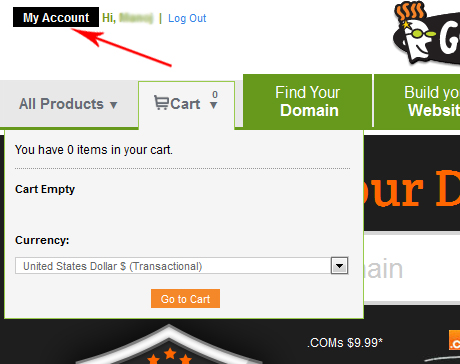
STEP 2 :- After logging in, click the My Account button on the top left.

Thursday, January 31, 2013

Change Nameservers at GoDaddy

A nameserver is similar to a telephone switchboard. It holds the information that tells the Internet where to find your web site and where to deliver your email. Name servers look something like this: 
ns1.example.com.

This post explains how to change your name server settings using GoDaddy. If your domain is registered at godaddy.com, you can change the nameservers to point to your web hosting account.

STEP 1 :-  Go to  At the top of the screen enter your Username/Customer# and Password and click Log In.
Change Nameservers at GoDaddy-login

STEP 2 :- After logging in, click the My Account button on the top left.
Change Nameservers at GoDaddy-My Account

Tuesday, November 23, 2010

How to park a domain in cPanel hosting?

Domain Parking is useful when you want people to get to your website with multiple domain name. (Domain Parking feature already exists in cPanel by default) Here’s the Domain Parking example: you have a website www.domain.com and now you wan your site to be easily access using other domain name as well. So you buy few more domains – www.domain1.com, www.domain2.com, www.domain3.com. By using the Domain Parking feature, visitor able to get into your www.domain.com using all the other new domain you buy just now.


Domain Parking – How to park a domain in cPanel Hosting
  1. Login to your cPanel
  2. Click on “Parked Domain”

Wednesday, November 17, 2010

How to create a CNAME record for a domain in Godaddy?

  1. Log in to your account at www.godaddy.com
  2. Open the Domains tab and select My Domain Names. You'll be directed to the Domain Manager page.
  3. Click the domain that you'd like to create CNAME record.
  4. Click the Total DNS Control And MX Records link at the bottom of the section entitled Total DNS.
  5. Click Add New CNAME Record in the box labelled CNAMES (aliases). If you've already created a CNAME record for your web address, click the pencil icon next to the existing CNAME record.
  6. Enter new DNS as the Host Name. Specify a TTL or use the default setting of 1 hour.
  7. Click OK, and then click OK again.

If you need ask questions about this post, please email to webhostinghelper@gmail.com

Wednesday, November 3, 2010

How to add addon domain in cPanel?

  1. To access the Addon Domains tool, click on the corresponding icon located on the main screen of your cPanel interface.
  2. Enter the name of the addon domain in the blank field next to New Domain Name.

Tuesday, October 19, 2010

How to point domain name to host?

In this post I will show you how to tell GoDaddy where your hosting account is, so that typing your domain name in their browser’s address bar will bring visitors to your web site. This is similar to updating your forwarding address at the post office when you move.
When you purchased your web hosting account, you received an e-mail with two or more DNS servers listed. This is the information you will need.
  1. Log into GoDaddy
    Start with logging into your GoDaddy account with the user ID and password you have used when purchasing your domain name.
  2. Go to the domain management screen
    Click on Domains button. It should be on the left side, towards the top, just under the GoDaddy logo. A menu will open. Select My Domain Names.
  3. Pick the domain name to update
    You will see the list of all your domain names. Click on the one you want to update - it should be exactly the same as the domain you typed in when buying a hosting package.

Monday, October 18, 2010

How to Register Domain Name?

If you have a web site, you should seriously consider registering your own domain name. A domain name is a name like "yoursite.com" or "yourcompany.com", which you can use to refer to your website. Note that you do not have to be a company or organisation to register a domain name. Any individual can do it too. Importance of a Domain Name

There are a number of good reasons for having a domain name:
  • If you ever change your web host, your domain name goes with you. Your regular visitors or customers who knew your site name as www.yoursite.com (for example) would not have to be informed about a change of URL. They would simply type your domain name and they'd be brought to your new site.
  • If you are a business, a domain name gives you credibility. Few people would be willing to do business with a company with a dubious URL like http://www.geocities.com/whatever/12345.

Friday, October 8, 2010

Web Hosting - Domain Names

What is a Domain Name?
A domain name is a unique name for a web site, like yoursite.com.
Domain names must be registered. When domain names are registered, they are added to a large domain name register. In addition, information about the web site, including the IP address, is stored on a DNS server.
DNS stands for Domain Name System. A DNS server is responsible for informing all other computers on the Internet about the domain name and the web site address.


Registering a Domain
Domains can be registered from domain name registration companies.
These companies provide interfaces to search for available domain names, and they offer a variety of domain name extensions that can be registered at the same time.

Choosing a Domain Name
Choosing a domain name is a major step for any individual or organization.
New domain name extensions and creative thinking still offer thousands of excellent domain names!
When choosing a name, it is important to consider the purpose of a domain name, which is to provide an easy way to reach your web site.
The best domains have the following characteristics:
Short - People don't like to type! A short domain name is easier to type, read, and remember.
Meaningful - A short domain is nothing without meaning, 754i4fh.com is not easy to enter or to remember. Select a domain that relates to your site in a way that people will understand.
Clear - Clarity is important when selecting a domain name. Avoid a name that is difficult to spell or pronounce.
Related Posts Plugin for WordPress, Blogger...