- Login to cPanel of your hosting account. Please use information you received from your hosting provider about your cPanel link, username and password.
- Once you login to cPanel, look for Fantastico icon. Some hosting providers don't offer this cPanel service. If you can't find the Fantastico icon, it's probably not included with your hosting.


Friday, November 30, 2012
How To Install Joomla 1.7 through cPanel with Fantastico
This post will give you a step by step guide on how to install Joomla from your cPanel. If you have hosting managed by cPanel software, there's a way to install Joomla quickly for your hosting account. I will explain this procedure here in all possible details. To write this post, I used my hosting account.

Thursday, November 22, 2012
How to Find a Website's IP Address Using Windows 7
There are many ways to obtain and use a website's IP address. This is an easy way to find them using an online tool or a PC.
1. Navigate to START → Accessories → Run
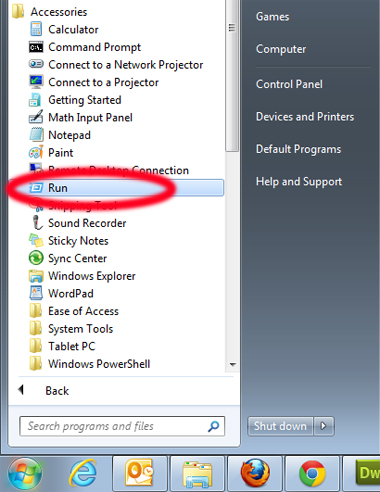
1. Navigate to START → Accessories → Run
Thursday, June 23, 2011
How to change file/folder permissions in cPanel?
All files on UNIX (including Linux and other UNIX variants) machines have access permissions. In this way the operating system knows how to deal with requests to access the files. There are three types of access:
- Read - Denoted as r, files with read access can be displayed to the user
- Write - Denoted as w, files with write access can be modified by the user
- Execute - Denoted as x, files with execute access can be executed as programs bythe user
- User - The owner of the file
- Group - Other files which are in the same folder or group
- World - Everyone else
Tuesday, June 14, 2011
How to redirect www URLs to non-www?
In order to redirect all requests for www.yourdomain.com to yourdomain.com, you should set the appropriate rewrite rule. This can be done by adding the following lines at the beginning of the .htaccess file in your public_html folder:
RewriteCond %{HTTP_HOST} ^www.yourdomain.com [NC]
RewriteRule ^(.*)$ http://yourdomain.com/$1 [L,R=301]
From now on, when someone accesses http://www.yourdomain.com she/he will be redirected to http://yourdomain.com.
Using this method is safe because it should not create any redirection loops nor it should interfere with other rewrite rules.
RewriteCond %{HTTP_HOST} ^www.yourdomain.com [NC]
RewriteRule ^(.*)$ http://yourdomain.com/$1 [L,R=301]
From now on, when someone accesses http://www.yourdomain.com she/he will be redirected to http://yourdomain.com.
Using this method is safe because it should not create any redirection loops nor it should interfere with other rewrite rules.
Subscribe to:
Posts (Atom)
